
ONSRA Electric Skateboard User Manual

ONSRA · Electric skateboard user manual
UserManual.
Set up, ride and look after your VELAR / VELAR 2.0, BLACK Carve 3 / 4, CHALLENGER / CHALLENGER 2.0 or ZENO – plus the legacy boards and the VANDAL e-bike.
Key figures
- Max rider load
- 150kg
- 330 lbs
- 150 kg / 330 lbs: VELAR (all versions), BC4, CHALLENGER 2.0 · 118 kg / 260 lbs: BC3, BC2, ZENO, CHALLENGER (1st gen)
- Rider age
- 13+
- Years
- Helmet required at all times
- Speed modes
- 4modes
- Default: CRUISE
- ECO · CRUISE · SPORT · BRUTALE
- Warranty · CNC parts
- 4years
- Battery & ESC: 1 year
- Same for all boards · products bought on onsra.eu
Dear Rider,
Thank you for choosing ONSRA. Get ready for an adventure like no other!
Read the Safety section completely before your first ride, and check whether and where you are allowed to ride an electric skateboard.
A lot of work and passion went into the development of this product to bring you the utmost riding experience. At ONSRA, we always put quality & performance first and take great pride in our electric skateboards. It is our hope that you will enjoy every moment spent on your board.
Our commitment to bring premium electric skateboards to every corner of the world at an affordable price is what drives us each day. We are truly honoured to have you as a member of the ONSRA riding community and are looking forward to hearing your thoughts!
Wishing you a safe and fun ride!
Sincerely yours, ONSRA worldwide
PS: Share your experience with us by using the hashtag #rideonsra – we're always looking for feedback!
Quick start
Your first ride in six steps. Each step links to the full chapter.
Your board
Pick your board from the list to see its parts, specs and charging port.
01 / 04VELAR 2.0 Belt Drive · Gear Drive

Parts · Belt Drive
VELAR 2.0 belt drive: gear ratio 4.4 · NX: Belt Drive, poles 7
- Belt Drive Motors
- Wheels
- Heatsink
- Deck
- Carbon Fiber Enclosure
- Front Trucks
- Charging Port
- Power Button
Charging the VELAR 2.0

See Charging for the safety rules and the charge indicator light.
Specs · VELAR 2.0 Belt Drive
VELAR 2.0 Gear Drive
The all-terrain VELAR with sealed CNC gear drives instead of belts – gear ratio 4.3, 200 mm pneumatic AT wheels and a carbon fiber enclosure.

Legend · VELAR 2.0 Gear Drive
- 1Gear-Drive Motors (6384 150Kv)
- 2Sealed CNC Gear-Drive Housings
- 3CNC Hubs w/ Gear-Drive Adapter
- 4200 mm Pneumatic AT Wheels
- 5Deck (Carbon Fiber)
- 6Enclosure (Carbon Fiber)
- 7Channel Trucks (CNC, 43 cm)
- 8Charging Port
- 9Power Button
Gear-drive riders must select 'Belt Drive' as the motor/drive type on the NX remote. This applies to the VELAR 2.0 Gear Drive and the BLACK Carve 4 (BC4). Set Motor Type = Belt Drive and Motor Poles = 7 – the same as belt-drive boards – then enter the gear ratio (VELAR 2.0 Gear Drive 4.3 · BC4 Street 2.6 · BC4 AT 4.3) and your wheel size. There is no separate “Gear Drive” option.
Measurements · official dimensions

NX remote setup · VELAR 2.0 Gear Drive
Motor type: Belt Drive (gear-drive riders always select Belt Drive).
Wheel size: 200 mm.
Gear ratio: 4.3.
Motor poles: 7.
02 / 04BLACK Carve 4 Gear Drive · Street & AT
BLACK Carve 4 (BC4) · Gear Drive
The BC4 uses an interchangeable gear drive (not belts). Ride it on 115 mm rubber street wheels or 200 mm AT wheels.

Legend · BC4
- 1Gear-Drive Motors (6475 170Kv)
- 2Gear Drive (interchangeable)
- 3Wheels (115 mm Rubber / 200 mm AT)
- 4TKP CNC Trucks
- 5Bamboo Deck
- 6Polymer Enclosure
- 7Charging Port
- 8Power Button
- 9Indicator LED
Gear-drive riders must select 'Belt Drive' as the motor/drive type on the NX remote. This applies to the VELAR 2.0 Gear Drive and the BLACK Carve 4 (BC4). Set Motor Type = Belt Drive and Motor Poles = 7 – the same as belt-drive boards – then enter the gear ratio (VELAR 2.0 Gear Drive 4.3 · BC4 Street 2.6 · BC4 AT 4.3) and your wheel size. There is no separate “Gear Drive” option.
Measurements · official dimensions

NX remote setup · BC4
Motor type: Belt Drive (gear-drive riders always select Belt Drive).
Wheel size: 115 mm (rubber) or 200 mm (AT).
Gear ratio: 2.6 (Street) or 4.3 (AT).
Motor poles: 7.
03 / 04CHALLENGER 2.0 Belt Drive · Street & AT
CHALLENGER 2.0 · Belt Drive · Street & All Terrain
The CHALLENGER 2.0 is belt drive. The first-generation CHALLENGER came in a Belt Drive and a Direct Drive version – see Legacy boards. Same deck and frame for Street and All Terrain – they differ in wheels, pulleys and height.
The maximum load of the CHALLENGER 2.0 (Street and All Terrain) is 150 kg / 330 lbs. Only one rider at a time.
CHALLENGER 2.0 Street

Legend · CHALLENGER 2.0 Street
- 1Belt-Drive Motors (5048 160Kv)
- 2Belts & Pulleys (40T Kegel)
- 3Wheels (100 mm Tarmax / 155 mm AT)
- 4TKP CNC Trucks
- 5Deck (Maple + Fiberglass)
- 6Enclosure (ABS, IP65)
- 7Kicktail
- 8Charge Port & Power Button
CHALLENGER 2.0 All Terrain

Legend · CHALLENGER 2.0 All Terrain
- 1Belt-Drive Motors (5048 160Kv)
- 2Belts & Pulleys (60T AT)
- 3155 mm HOTA AT Wheels
- 4TKP CNC Trucks
- 5Deck (Maple + Fiberglass)
- 6Enclosure (ABS, IP65)
- 7Kicktail
- 8Charge Port & Power Button
Measurements · CHALLENGER 2.0


04 / 04ZENO NEW Dual hub motors
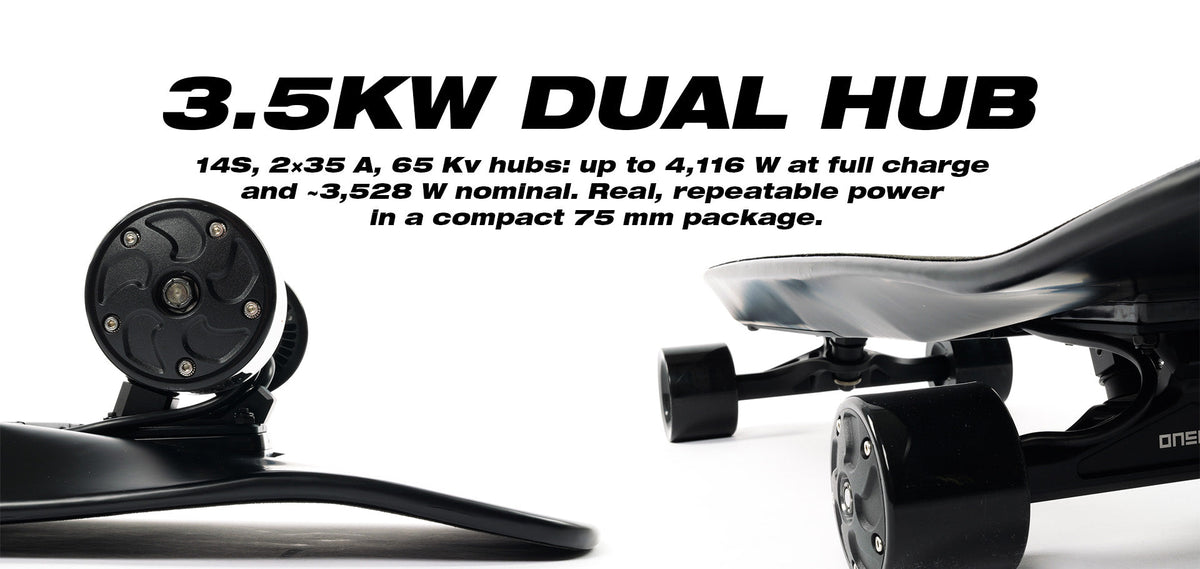
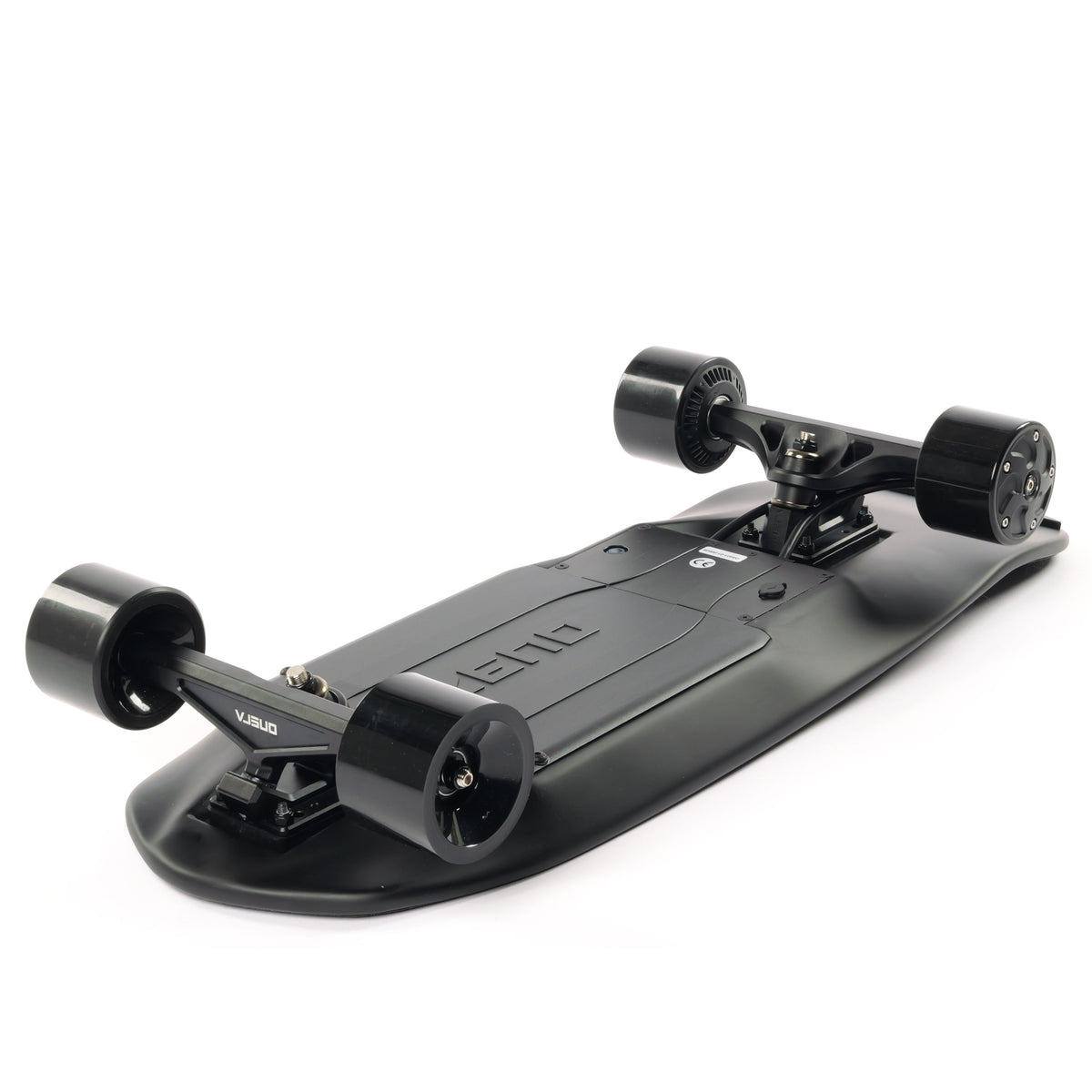
A lightweight kicktail electric skateboard with stealthy hub motors and a 14S battery system, plus a swappable 99Wh travel battery for commuting or flights.

Blueprint

Legend · ZENO
- 1Dual Hub Motors (rear)
- 2Front Wheels (75 mm)
- 3Trucks (TKP CNC)
- 4Deck (Carbon Fiber)
- 5Kicktail
- 6Charge Port & Power Button (underside bay)
Measurements · official dimensions

Full specs
The maximum load of the ZENO is 118 kg / 260 lbs – the same as the BLACK Carve 3. VELAR, BC4 and CHALLENGER 2.0 are rated 150 kg / 330 lbs. Only one rider at a time.
Show ZENO spec sheet & photos

ZENO ride modes
Switch modes with the OPTION button on the ONSRA NX remote. Speed and brake strength per mode are adjusted in Menu: MODES.
Push assist is rolling out – not an official feature yet.
The whole board can be limited to 25 km/h. Contact us at [email protected] if you need this.
Charging & turning on the ZENO
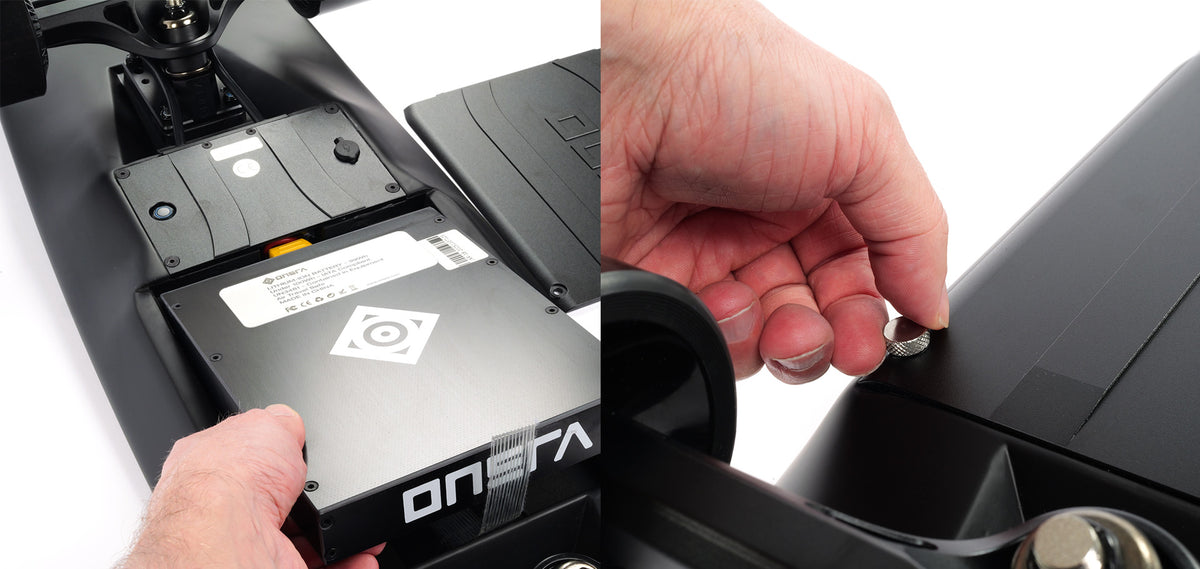
The charging port and the power button are both in the battery bay on the underside of the deck, next to the removable battery.
Turning on: push the power button in the battery bay to turn the ZENO ON/OFF. Everything else works as described in Powering on: hold the remote's power button for 2 seconds, once paired you can power the board on from the remote, it powers OFF automatically after 5 minutes of inactivity, and after 2 days unused you need to press the button on the board again.
See Charging for the safety rules: never charge when anything is wet, stay nearby, don't charge overnight, and only use the original charger.
Swapping the battery
Turn the board OFF and unplug the charger.
Turn the board upside down on a soft, clean surface.
Open the battery enclosure – option A: with a 3 mm hex (Allen) tool (factory-fitted hex screws, the cleaner look) · option B: tool-free with the included knurled thumb screws. Both screw sets come with the board.
Unplug the yellow XT60 connector that joins the battery to the board, then lift the battery out.
Put the other battery (99Wh or 259Wh) in, plug the yellow XT60 connector back in until it is fully seated, and close the enclosure. Do not overtighten the screws or use power tools.
Turn the board on and check the battery level on your ONSRA NX remote.
Flying with the ZENO
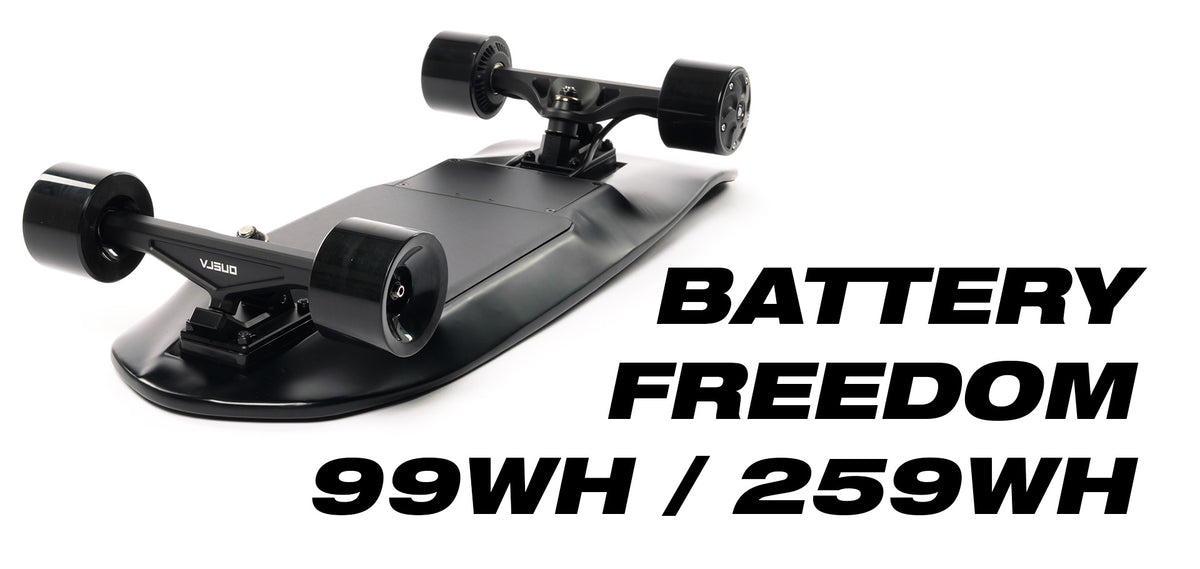
- Fly with the 99Wh battery only (ZENO Flight Safe).
- Batteries are swappable with plug-and-play connectors, so you can switch to the 259Wh pack for long rides on the ground.
- Each battery sits in a reinforced fiberglass enclosure.
- Weight with the 99Wh battery: 6.5 kg / 14 lb.
- Carry the 99Wh battery as carry-on. Airline rules can differ, so please check your airline's battery policy before you fly.
Remote, pairing & everything else
Your ZENO ships with the ONSRA NX remote already paired and set up. If you get a new remote or the connection is lost, follow Pairing. On the NX select Motor Type = Belt Drive – that is correct for the ZENO even though it has hub motors.
Everything else in this manual applies to the ZENO too: Quick start, Safety, Charging, Home screen, Menu settings, Alerts, Battery care, Stance and the Warranty exclusions.
Compare all boards
Key facts for every current ONSRA board, from the onsra.com product pages. Range figures are for a 75 kg rider in good conditions. WB = wheelbase · — = not listed yet.
| Board | Drive · NX setup | Motors · ESC | Wheels | Range | Top speed | Battery | Weight | Max load | Size |
|---|---|---|---|---|---|---|---|---|---|
| VELAR 2.0Belt Drive | Belt · 66T / 15T · ratio 4.4 NX: Belt Drive, poles 7 |
2× 3500 W 6384 150Kv ORION 2× 120 A max (per motor) |
200 mm pneumatic AT | 60 km / 37 mi up to 70 km / 44 mi (optimal conditions) |
65 km/h / 40 mph up to 70 km/h / 43 mph |
1036 Wh 14S4P · 20 Ah |
19.4 kg / 42.7 lbs | 150 kg / 330 lbs | Deck 92.3 × 28.3 cm / 36.3 × 11.1″ WB 96.5 cm / 38″ |
| VELAR 2.0Gear Drive | Gear · ratio 4.3 NX: Belt Drive, poles 7 |
2× 3500 W 6384 150Kv ORION 2× 120 A max (per motor) |
200 mm pneumatic AT | 60 km / 37 mi up to 70 km / 44 mi (optimal) |
65 km/h / 40 mph with 200 mm AT wheels |
1036 Wh 14S4P · 20 Ah |
18.4 kg / 40.6 lbs | 150 kg / 330 lbs | Deck 92.3 × 28.3 cm / 36.3 × 11.1″ WB 96.5 cm / 38″ |
| BLACK Carve 4Street | Gear · ratio 2.6 NX: Belt Drive, poles 7 |
6475 170Kv ORION 14S 75 A |
115 mm rubber | 50 km / 31 mi ECO 40 km / 25 mi BRUTALE |
62 km/h / 38 mph 115 mm, out of the box |
777 Wh 14S3P · 15 Ah |
15.5 kg / 34 lbs | 150 kg / 330 lbs | Deck 102 cm / 40″ WB 100 cm / 40″ |
| BLACK Carve 4AT | Gear · ratio 4.3 NX: Belt Drive, poles 7 |
6475 170Kv ORION 14S 75 A |
200 mm AT tyres | 50 km / 31 mi ECO 40 km / 25 mi BRUTALE |
62 km/h / 38 mph 200 mm, out of the box |
777 Wh 14S3P · 15 Ah |
15.8 kg / 34.8 lbs | 150 kg / 330 lbs | Deck 102 cm / 40″ WB 100 cm / 40″ |
| CHALLENGER 2.0Street | Belt · 40T / 14T · ratio 2.9 NX: Belt Drive, poles 7 |
2× 1950 W (2× 2500 W max) 5048 160Kv ORION 2× 45 A (per motor) |
100 mm Tarmax | 38 km / 24 mi up to 43 km / 26 mi |
50 km/h / 31 mph up to 62 km/h / 38 mph (32T pulley, 110 mm wheel) |
444 Wh 12S2P · 10 Ah |
9.9 kg / 21.8 lbs | 150 kg / 330 lbs | Deck 90 × 27 cm / 35 × 10.6″ WB 69 cm / 27.1″ |
| CHALLENGER 2.0AT | Belt · 60T / 14T · ratio 4.3 NX: Belt Drive, poles 7 |
2× 1950 W (2× 2500 W max) 5048 160Kv ORION 2× 45 A (per motor) |
155 mm HOTA AT | 24 km / 15 mi 38 km / 24 mi on street wheels |
48 km/h / 30 mph 60T pulley · up to 52 km/h / 32 mph (55T) |
444 Wh 12S2P · 10 Ah |
10.1 kg / 22.2 lbs | 150 kg / 330 lbs | Deck 90 × 27 cm / 35 × 10.6″ WB 69 cm / 27.1″ |
| ZENODual hub motor | Hub motors NX: Belt Drive |
Hub 65Kv ORION 14S 35 A |
75 × 56 mm PU 76A | 17.6 km / 11 mi ECO 13.2 km / 8 mi BRUTALE |
45 km/h / 28 mph | 99 Wh or 259 Wh 14S1P · swappable |
6.5 kg / 14 lbs (99 Wh) 6.8 kg / 15 lbs (259 Wh) · 5.5 kg / 12 lbs without battery |
118 kg / 260 lbs | 71.5 × 24.5 cm / 28.15 × 9.65″ WB 48 cm / 18.9″ |
150 kg / 330 lbs for the VELAR 2.0 (Belt Drive & Gear Drive), the BLACK Carve 4 (Street & AT) and the CHALLENGER 2.0 (Street & AT). 118 kg / 260 lbs for the ZENO. Only one rider at a time. Older boards: see Legacy boards.
Legacy boards
Older ONSRA boards: the first-generation VELAR (Belt Drive and Gear Drive), the BLACK Carve 3, plus the BLACK Carve 2 and the first-generation CHALLENGER (each in a Belt Drive and a Direct Drive version). The Safety, Charging, Maintenance, Battery care and Warranty chapters apply to these boards too.
The BLACK Carve 2 and the first-generation CHALLENGER were supplied with an older LCD remote, not the ONSRA NX. Its functions are described below in Legacy LCD remote. The spec sheets for the first-generation VELAR, the BLACK Carve 3 Pro and the CHALLENGER 1.0 list the ONSRA NX remote. The NX chapters (Remote, Pairing, Home screen, Speed modes, Menu, Alerts) only apply if you use an ONSRA NX remote.
VELAR (1st gen) · Belt Drive & Gear Drive
The first-generation VELAR came in a Belt Drive and a Gear Drive version. For the parts diagram and the charging port, see the VELAR in Your board; the current model is the VELAR 2.0.
Specs · VELAR (1st gen) · Belt Drive
Specs · VELAR (1st gen) · Gear Drive
BLACK Carve 3 · BC3 Pro

Parts · BLACK Carve 3 (Belt Drive)
- Belt Drive Motors
- Wheels
- Heatsink
- Deck
- Carbon Fiber Enclosure
- Front Trucks
- Charging Port
- Power Button
- Indicator LED
Charging the BLACK Carve 3

See Charging for the safety rules and the charge indicator light.
Specs · BLACK Carve 3 Pro · Direct Drive
BLACK Carve 2 · Belt Drive & Direct Drive
Parts: 1 Belt Drive Motors (Direct Drive Motors on the Direct Drive version) · 2 Wheels · 3 Motherboard Cover · 4 Deck · 5 Carbon Fiber Casing · 6 Front Trucks · 7 Charging Port · 8 Power Button · 9 Indicator LED.


Charging the BLACK Carve 2

CHALLENGER (1st gen) · Belt Drive & Direct Drive
Parts: 1 Belt Drive Motors (Direct Drive Motors on the Direct Drive version) · 2 Wheels · 3 Motherboard Cover · 4 Canadian Maple Deck · 5 High Quality ABS Casing · 6 Front Trucks · 7 Charging Port · 8 Power Button · 9 Indicator LED. The CHALLENGER 2.0 is a different board – see Your board.


Charging the CHALLENGER (1st gen)


Parts · CHALLENGER 1st gen (Direct Drive version)
- Direct Drive Motors
- Wheels
- Motherboard Cover
- Canadian Maple Deck
- High Quality ABS Casing
- Front Trucks
- Charging Port
- Power Button
- Indicator LED
Charging the CHALLENGER

See Charging for the safety rules and the charge indicator light.
Specs · CHALLENGER 1.0 Street (Belt Drive)
Specs · CHALLENGER 1.0 AT (Belt Drive)
Legacy LCD remote
The older LCD remote (BLACK Carve 2, first-generation CHALLENGER) – not the ONSRA NX. Controls: thumb wheel (acceleration and braking), Mode Change and Reverse button, Power ON/OFF button and an LCD display. The main screen shows the remote battery, board battery, speed, units and direction, today's and total distance and the speed mode.

Pairing the remote with the board
Hold the board's power button until the LED starts blinking.
Hold the power button on the remote. The screen shows REMOTE PAIRING, then REMOTE PAIRED OK!
Direction, speed modes & cruise
- Direction: while the board is stopped, double-click the mode change button to switch between forward and reverse.
- Cruise mode: fully accelerate and click the power button once. To disable cruise mode, just brake.
ATTENTION! Only use cruise mode if you're already comfortable riding your ONSRA board and in a safe place! Start in ECO until you are used to the board.
Remote setup
In the setup menu, the thumb wheel changes between the options, the mode button goes to the previous option and the power button confirms (OK / next option).

Legacy remote alerts
These alert screens can appear on the legacy LCD remote:


- LOW TEMPERATURE – below 0 °C. Be cautious of slippery road conditions.
- BATTERY OVERHEAT (55 °C) – the board battery temperature is too high.
- ESC OVERHEAT (100 °C) – ESC temperature is too high. ESC OVERHEAT (120 °C) – stop riding! Cool it down before use.
- MOTOR OVERHEAT (100 °C) – motor temperature is too high. MOTOR OVERHEAT (120 °C) – stop riding! Cool it down before use.
- MOTOR BREAKDOWN – motor seizing or malfunction.
- HEAT PROTECTION WARNING – to protect the electric system from overheating, the board reduces its performance so it can cool down. Until it reaches a safe temperature you cannot change speed modes.
- HIGH VOLTAGE (51 V) – voltage is too high. HIGH VOLTAGE (51.8 V) – stop riding! Discharge it before use.
- LOW TEMPERATURE / HIGH TEMPERATURE (charging) – charge temperature too low / too high.
- DISCONNECTED – the remote is disconnected from the board.
- BATTERY / BMS ERROR – please check the battery communications port.
Charging the legacy remote
The remote charges over USB. When the battery indicator in the remote shows it's complete, you are ready to go! The same charging rules apply as for the board: never charge when anything is wet, stay nearby, do not charge overnight and do not use non-CE power supplies or plugs.

On these boards the battery cannot charge past 50.4 volts, as the charger has voltage cutoff detection – still, remove it from the charger once the charger LED shows green.
Stance (legacy boards)
The best way to find out whether you ride Regular or Goofy is to just ride and see what's more comfortable for you. ONSRA uses powerful motors that can throw you off balance quickly if you're not ready – use speed mode 1 (ECO) until you are used to the board.

Read before riding
ALWAYS check all screws, wheels, belts, motors and the overall board condition before riding. Do not overtighten any screws or use any power tools to tighten the screws. Use this checklist to make sure everything is ready:
- Check each truck bushing screw
- Check the truck screws
- Check the enclosure screws
- Belt-drive boards: check belt tension (2 mm slack is good)
- Check the wheel nuts
- Check the wheels for wear (replace them if they look irregular)
- Check the board for cracks
- Check motors and belts for any damage (replace if they look damaged)
Modes SPORT and BRUTALE have more power, so the remote acceleration and brakes are highly sensitive. Always be very gentle with the remote controller's thumb wheel to avoid being thrown off the board.
Make sure both the board and remote batteries are charged before riding. It's common to forget to charge the remote.
Before using the board, please make sure that riding electric skateboards is LEGAL in your country, and get familiar with the local laws on electric skateboards. For example, in some places it is illegal to ride an electric skateboard at night, there is a minimum age, you cannot exceed a specific speed, or you must wear a helmet (on an ONSRA board you must wear a helmet at all times anyway). In some places electric skateboards must be registered as motor vehicles or insured as light motorcycles. We cannot be responsible for your compliance with these laws, so it is YOUR OWN RESPONSIBILITY to make sure you know, understand and follow them when using the board.
Before every ride, check and obey your local laws on whether and where electric skateboards may be ridden – for example on public roads, cycle paths, pavements or only on private ground. If riding is not allowed where you are, do not ride there.
Show original manual page

Safety
It takes time to get used to riding an electric board, even if you have ridden a manual board before. Skateboarding can be dangerous! RIDE AT YOUR OWN RISK AND ALWAYS USE COMMON SENSE.
YOU MUST WEAR A HELMET AT ALL TIMES.

Parents and guardians: parents should ensure that the board is only used by children of an appropriate age, size and maturity, who have the skills and ability to ride the board. Children should always be supervised by an adult until the child can use the board competently and safely.
- The electric skateboard is not a toy, and should be treated with appropriate caution.
- Always practise safety first. It's possible to lose your balance and cause a collision or fall. Use the board in a safe, appropriate environment and always wear safety gear.
- You must wear a helmet at all times, plus all the relevant safety equipment when riding (elbow pads, knee pads, gloves and a strong pair of shoes).
- Check and obey your local laws on whether and where electric skateboards may be ridden. Always obey and check the local road rules in your area for where you can ride. Do not ride on busy roads with traffic and white markings. Always respect pedestrians!
- Wear closed-toe shoes – flip-flops or similar loose footwear are not suitable riding wear.
- Maximum load: 150 kg / 330 lbs for every VELAR (all versions), the BLACK Carve 4 and the CHALLENGER 2.0 (Street & AT); 118 kg / 260 lbs for the BLACK Carve 3, the BLACK Carve 2, the ZENO and the first-generation CHALLENGER. Exceeding this weight will compromise the structural integrity as well as balance, functionality and performance.
- Only one person can ride the skateboard at a time. More than one is extremely dangerous.
- 13+ The skateboard is designed for riders aged 13 and above; please use caution.
- DO NOT RIDE the board if you are under the influence of any drugs or alcohol.
- DO NOT RIDE the board in wet conditions – not only is it dangerous, the board is not waterproof and water can damage components like the motors, bearings and electronics. The IP65 rating of the ZENO and the CHALLENGER 2.0 enclosure is splash protection, not waterproof: riding in wet conditions is still not allowed – if you do, it is at your own risk and water damage is not covered by the warranty.
- Whenever you ride, you risk serious injury or even death from loss of control, collisions or falls. To ride safely, you must read all instructions, safety messages and warnings in this manual.
- Avoid riding on sand, gravel, mud, rugged or open ground. ONSRA boards are designed to be ridden on flat, paved surfaces. Use different wheels for different occasions.
- Do not ride on slippery ground, such as snow, ice or wet ground.
- Keep fingers, hair and clothing away from belts, motors, wheels and moving parts.
- Keep a safe distance from other people and stationary objects while riding. Do not ride in crowded spaces – you could be a danger to yourself and other people.
- Do not ride at night, in dark locations or in low visibility.
- Stop using the board when the battery is low!
Riding on hills can be very dangerous. If you ride up a very steep hill and want to ride down this same hill, you must know how to control your speed without relying on the electric brakes. It is always important to know how to handle the board in case of a malfunction.
Riding continuously on a very steep hill puts huge stress on the electronics. If you feel the board slowing down on a steep hill, the current protection is active and warning you that the board is working too hard – stop to avoid damaging the electronics. DAMAGE TO ELECTRONICS THROUGH STRAIN ON MOTORS IS NOT COVERED BY WARRANTY.
WARNING: Avoid electrical shocks. Do not open or tamper with electrical parts.
Show original manual pages


Charging the board
Do NOT plug in the power cord when the charging port, power cord or power outlet is wet. Always stay nearby while charging: do not leave the board charging alone or charge overnight. Do not use non-CE power supplies or plugs! Only use the charger, plugs and cables that originally came with your skateboard.
Battery charge indicator light
Model-specific charging pictures are in Your board.
Charging the NX remote

Powering on the board and the remote
Once paired
(See Pairing.) You can power on your board directly with your remote controller. After 5 minutes of inactivity, the board powers OFF automatically. If you don't use the board for 2 days, you need to power ON the board again by pressing the button on the board to reactivate the automatic power-on feature.

ONSRA NX remote controller
Controls
- ALCD screen
- BThrottle wheel
- CON/OFF button
- DOption button
- ECharging port
Screen
- Odometer
- Acceleration indicator
- Board battery indicator
- Speed mode
- Remote battery indicator
- Brake indicator
- Speed indicator (km/h or mph)
- Trip timer


Pairing
Follow these steps to pair the remote with your electric skateboard:
Press and hold the ON/OFF button of your ONSRA NX remote for 5 seconds.
Select 2WD and press ON/OFF to confirm.
The PAIRING screen appears.
Press and hold the power button of your electric skateboard for 5 seconds.
The PAIRED screen confirms that your remote is now paired.
Set up the parameters
Thumb wheel up/down to change · ON/OFF to confirm · OPTION to go back.
Select KMH or MPH.
Select the motor type (Belt Drive or Direct Drive). Belt drive and gear drive (VELAR Gear Drive, BC4): select Belt Drive, motor poles 7.
Select the wheel diameter.
Belt Drive (incl. gear drive): enter the correct gear ratio – VELAR 2.0 belt 4.4, CHALLENGER 2.0 Street 2.9 / AT 4.3; gear drive: VELAR Gear Drive 4.3, BC4 Street 2.6 / AT 4.3 (see Gear ratio).
Motor poles: select 7 for Belt Drive, 10 for Direct Drive.
Your remote is now set up correctly.
Gear-drive riders must select 'Belt Drive' as the motor/drive type on the NX remote. This applies to the VELAR Gear Drive and the BLACK Carve 4 (BC4). Set Motor Type = Belt Drive and Motor Poles = 7 – the same as belt-drive boards – then enter the gear ratio (VELAR Gear Drive 4.3 · BC4 Street 2.6 · BC4 AT 4.3) and your wheel size. There is no separate “Gear Drive” option.

Home screen
You can customise the screen of the ONSRA NX remote. Click the ON/OFF button to scroll through the options:

Speed modes
There are 4 speed modes. Switch between them by clicking the OPTION button. Default mode: CRUISE.
| Mode | Top speed | Accel. | Brake |
|---|---|---|---|
| ECO | 20km/h | 30% | 40% |
| CRUISE Default | 30km/h | 50% | 50% |
| SPORT | 45km/h | 70% | 70% |
| BRUTALE | Board max | 100% | 100% |
These are the standard values. You can customise each speed mode – see Menu: MODES.
BRUTALE is full power – it unlocks the top speed of your board and setup (motors, wheels, gearing): the board’s maximum speed, nothing more.

Auto reverse
To activate AUTO REVERSE mode, hold the throttle backwards for 2 seconds. You can turn auto reverse on or off in Menu: AUTO REV.
Menu settings
To open the menu, press and hold the OPTION button for 4 seconds. You get 4 options: BOARD, AUTO REV, MODES and INFO.
How to navigate: thumb wheel up/down to select · ON/OFF to choose · OPTION to go back · hold OPTION 4 s to exit.

Menu: BOARD
Customise the motor type, wheel size and units.
- Motor type: Belt Drive (then set the gear ratio, e.g. 3.2) or Direct Drive. Poles: 7 for Belt Drive, 10 for Direct Drive. Gear-drive riders must select 'Belt Drive' as the motor/drive type, poles 7 and gear ratio (VELAR Gear Drive 4.3 · BC4 Street 2.6 / AT 4.3).
- Wheel size: select from 80 mm to 200 mm.
- Units: KM/H or MPH.

Menu: AUTO REV
Turn the auto reverse feature on or off.
- You can increase or decrease the speed of REVERSE mode: go to Menu MODES and change the speed % in the ECO SET.
- If AUTO REV is turned off, press the OPTION button twice on the main screen to activate REVERSE mode. This is different from AUTO REV: when you accelerate, you go backwards.

Menu: MODES
Select the speed mode to edit (ECO SET, CRUISE SET, SPORT SET, BRUTALE SET), then set each value from 10–100%:

Menu: INFO
Shows your board's stats and the ABOUT page:
- Current ride time / distance
- Average ride speed
- Battery voltage
- Highest ride amperage & speed
- Consumption (Wh/km)
- Current ESC temperature / highest ESC temperature
- Current motor temperature / highest motor temperature
- Total ride distance & total ride time
- Firmware version

Alerts
These alert screens can pop up on your ONSRA NX remote:

Troubleshooting & FAQ
What should I do if I have a problem with my board?
If you have an issue with your board, please contact us before doing anything yourself. Do not open the board without our agreement first – that would void the warranty. Contact us at [email protected].
Common issues
Board won't power on
- Charge the board with its original charger and check the charger light (solid red = charging, green = full).
- Press the power button on the board itself – after 2 days unused the remote can't wake the board.
- ZENO: check that the yellow XT60 battery connector is fully seated and the battery cover is closed.
- Still nothing? Don't open the board – contact [email protected].
Remote won't pair or keeps disconnecting
- Charge the remote – a low remote battery causes drop-outs.
- Turn board and remote off and on again.
- Re-pair: hold the remote's ON/OFF for 5 s, select 2WD, then hold the board's power button for 5 s – see Pairing and the reconnect video.
- After pairing, check motor type, poles, wheel size and gear ratio (belt and gear drive: Belt Drive, poles 7; gear drive ratio: VELAR Gear Drive 4.3, BC4 Street 2.6 / AT 4.3).
Battery not charging
- Make sure port, cable and outlet are dry and clean, and the plug is fully inserted.
- Try another wall outlet. Use only the original charger.
- No light on the charger, or it never turns green? Stop and contact support – don't use another charger.
- Let a very cold board warm up to room temperature before charging.
Less range in the cold
- Normal for lithium batteries: low temperatures reduce range, top speed and acceleration (see Battery care).
- Store and charge the board at room temperature; don't leave it in a cold (or hot) car.
- The remote shows a Low temperature alert below 0 °C – watch for slippery roads.
Braking feels weak or too strong
- Braking is regenerative. With a full battery (High voltage alert) the brakes are weaker – ride on flat ground first, then go downhill.
- Brake strength per mode is adjustable in Menu: MODES. SPORT and BRUTALE brake hard – be gentle with the thumb wheel.
- Practise braking in ECO; lean back when you brake (Stance).
Wrong speed or distance on the remote
- Check motor type, wheel size and gear ratio in Menu: BOARD.
- Belt and gear drive: Belt Drive, poles 7. Gear drive: VELAR Gear Drive 4.3, BC4 Street 2.6 / AT 4.3. Belt: VELAR 2.0 4.4, CHALLENGER 2.0 Street 2.9 / AT 4.3.
Board slows down on a steep hill
- Our electronics have current protection. If the board slows on a steep hill, the protection is active – consider stopping to avoid damaging the electronics.
NX remote alerts
What each alert on your ONSRA NX remote means and what to do. If your remote shows a message that isn't listed, note it down and contact support.
| Alert on screen | What to do |
|---|---|
| Board disconnected | Press the board's power button; re-pair if needed (Pairing). |
| Board charging | Normal while plugged in. Stay nearby, never charge overnight. |
| ESC overheat | Stop, let the board cool down before riding again. |
| Motor stalling | Turn the board off; check wheels, motors and drive for anything blocking them. |
| Motor overheat | Stop riding and let the motors cool down. |
| High voltage | Battery is very full – braking is weaker. Discharge a little on flat ground before going downhill. |
| Low temperature | Below 0 °C – expect less range and watch for slippery roads. |
| Board low battery | Below 20% – stop riding and charge. |
| Remote low battery | Charge the remote to avoid losing connection. |
| Remote calibration | Turn the board upside down to start calibration (see video below). |
Still stuck?
Maintenance guide
If you regularly clean and maintain your electric longboard / skateboard, it will last a long time and ride at its best:
- Always clean your bearings for the smoothest ride. Dirty bearings hurt ride quality, which may reduce battery performance and cause bearing failure.
- Always check all screws and nuts on your skateboard / longboard.
- Swap the front wheels with the back wheels once the motor truck wheels are worn out. This way you can use the wheels a lot longer.
- Regularly clean & check the belt and drive gear area for any damage. Contact our support service if you have any questions or think something might be wrong.
- Always store your board at room temperature (see Battery care).
- Clean dust and dirt off your board so it looks and rides like new. Use a damp & dry cloth to clean.
- Keep your All Terrain tyres between 30–45 PSI when riding. At low pressure, the risk of a flat tyre is a lot higher.
- Before every ride, run the checklist in Read before riding.
YOU ARE RESPONSIBLE FOR THE MAINTENANCE OF YOUR EQUIPMENT. Failure of any part due to lack of basic maintenance is not covered by warranty.
Maintenance checklist
- Belt tension (about 2 mm slack) and wear
- Pulley and motor-mount screws
- Gear-drive boards: check the sealed gear housings for any damage
- Rotate front/rear wheels
- Bearings and wheel nuts
- Bushing check and inner-bushing setup
- AT tyre pressure (30–45 PSI)
- Damp, dry cloth only – no pressurised water
- Keep port, enclosure and remote dry
- Clean the drive area and bearings
- Charge with the original charger only
- Store at 40–60% if unused for one month or more
- Store at room temperature; less range in the cold is normal
- Your firmware version is shown in Menu: INFO → ABOUT
Show original manual page

Battery care
Your battery, and therefore your board, should always be stored at room temperature. Excessive heat can permanently affect or damage the battery. The board has heat protection software to warn you when the battery is overheating. If the board is left in a hot car or hot environment, or exposed to other sources of excessive heat, the software can't reduce temperatures and your battery may be affected.
Cold temperatures affect battery life and power output. When riding in low temperatures you may get lower range, top speed and acceleration. Exposing the battery to very low temperatures may cause permanent damage.
The battery cannot charge past the voltage limit because the charger has voltage cutoff detection. However, we recommend unplugging your board once the charger shows green. Do not leave your board unattended while charging – always be home and keep an eye on it. Only use the original charger that came with the board, and never use other accessories such as cables and adapters.
- Don't ride your board down to 0%. This can unbalance your cells and you may notice a loss of range. Stop riding when you get the low battery warning on the ONSRA NX remote.
- You can use the fast charger occasionally if you're in a rush, but we don't recommend it for every charge. It's better to charge slowly with the regular charger.
If you won't use your battery for one month or more, store it between 40 and 60%. Leaving it fully charged and unused can permanently reduce its total capacity. If the battery is stored nearly empty for a long time, it may drop to an unrecoverable voltage.
Show original manual page

Stance
The best way to find out whether you ride Regular or Goofy is to just ride and see what's more comfortable for you.
ONSRA boards have a powerful setup that can throw you off balance quickly if you're not ready. Use speed mode ECO until you feel comfortable.

Additional information
How to calculate the gear ratio
Divide the number of teeth on the wheel pulley by the number of teeth on the motor pulley. A gear ratio applies to belt drive and gear drive boards, not to direct drive motors.
Belt-drive ratios: VELAR 2.0 4.4 · CHALLENGER 2.0 Street 2.9 (14T/40T) · CHALLENGER 2.0 AT 4.3 (14T/60T).
If you don't set the correct values, the ONSRA NX remote will show wrong speed and distance values.
Gear drive (VELAR Gear Drive, BC4)
Gear-drive riders must select 'Belt Drive' as the motor/drive type on the NX remote. This applies to the VELAR Gear Drive and the BLACK Carve 4 (BC4). Set Motor Type = Belt Drive and Motor Poles = 7 – the same as belt-drive boards – then enter the gear ratio (VELAR Gear Drive 4.3 · BC4 Street 2.6 · BC4 AT 4.3) and your wheel size. There is no separate “Gear Drive” option.
Cruise control
Cruise control keeps your board at the same speed without touching the throttle. While riding, accelerate to the speed you want and click the ON/OFF button once. The board stays at that speed. To turn off cruise control, simply brake or accelerate.
Tyre pressure for AT wheels
Before riding, inflate your tyres to the correct pressure. The recommended pressure is printed on the tyre itself. We recommend about 3 bar or 45 PSI.
Show original manual page

Warranty, support & legal
Our electric skateboards are warranted to the original purchaser to be free of defects in materials and workmanship. The warranty is non-transferable.
The warranty is the same for all boards – VELAR / VELAR 2.0 (incl. Gear Drive), BLACK Carve 3 / 4, CHALLENGER / CHALLENGER 2.0 and ZENO: 4 years on CNC parts, 1 year on the battery and ESC, other components: 2 years, from the date of purchase, against manufacturing defects.
We only provide warranty for products purchased on onsra.eu; purchases from other sources are excluded.
We are not liable for incidental or consequential loss or damage caused directly or indirectly by the use of this product.
What is covered
CNC-machined parts (such as the CNC trucks) for 4 years. The battery and the ESC for one year against manufacturing defects from the date of purchase – lithium batteries can be replaced within a year if they haven't been disassembled. Other components such as the deck, motors, enclosure, charger and remote controller: 2 years. Charge the lithium battery once every two weeks when you're not using it. Other accessories are not covered.
What is NOT covered
- Wheels, bearings, bushings and grip tape are wear-and-tear items and are not covered.
- Damage caused by improper use, improper maintenance or improper storage.
- Any damage outside of normal use.
- Damage caused by unauthorised repairs or unauthorised parts – do not open the board without our agreement first.
- Damage or injury to the rider or other objects caused by the skateboard or its accessories.
- Normal battery degradation from use.
- Damage to the battery from incorrect charging or leaving it uncharged for a long time.
- Damage to electronics through strain on motors (for example continuous riding on very steep hills).
- Damage caused by exceeding the maximum load of your board, or by carrying more than one person.
- Damage caused by using third-party or non-original chargers or charging accessories not approved by ONSRA.
- Damage sustained during shipping or improper transport, unless done by ONSRA-approved carriers.
- Products used for rental or commercial purposes.
- Firmware tampering: altering or modifying the board's software or firmware voids the warranty.
Warranty conditions
- This warranty applies only to the original purchaser and is non-transferable.
- Warranty claims must be accompanied by a valid proof of purchase.
Abuse to the board is not covered
Do not jump on the board, ride off curbs, smash the board into hard objects, or drop the board on the ground to start it. The product is made to handle tough riding, but it is still an electrical product and needs to be handled with care and respect.
Water damage is not covered
Do not ride on wet surfaces, do not ride in the rain, do not let the remote get wet, and do not wash your board with pressurised water, since water can get through the battery enclosure. Clean your board with a slightly damp cloth.
No other express or implied warranty is given. We will replace free of charge any component parts we find to be defective in materials or manufacture under normal use during the warranty period. The original purchaser is responsible for all labour charges for repair or replacement of parts after the warranty period, or if we find that the problem comes from unusual use of the board.
Battery safety
- Do not open the battery. There is a risk of short circuit, and opening the battery voids the warranty.
- Protect the battery against mechanical damage, heat (for example prolonged exposure to sunlight), fire and immersion in water. There is a risk of explosion. In case of damage and improper use of the battery, vapours may emanate. Keep children away from the battery.
- Never charge the battery in a flammable environment. The charger and the board must be placed on a dry, non-flammable surface.
- Never charge or use a defective or damaged battery.
- Do not place any metal object into the charging port – this can cause a short circuit, make the battery non-chargeable and voids the warranty.
- Never send a battery by postal mail by yourself! A battery is classed as hazardous / dangerous goods and requires certification to send. Contact [email protected] first.
- Do not dispose of the battery in your household waste. Follow your local regulations for lithium-ion batteries.
- Failure to properly charge, store or use your battery voids the warranty and may cause a hazardous situation.
Registration
For your records, keep your original sales receipt – a valid proof of purchase is required for any warranty claim – and note your board's serial number.
Support
If you have an issue with your board, contact us before doing anything yourself: [email protected]. It helps if you include:
- Your order number and the board's serial number
- Board model (and wheels / drive if changed)
- What happens, plus photos or a short video
- Any alert shown on the NX remote and the firmware version (Menu: INFO → ABOUT)
Returns
Returns are handled according to our Return Policy. Full warranty terms: onsra.eu/pages/warranty.
Please contact [email protected] before sending anything back.
Safety & legal
Read Safety and Read before riding before your first ride. It is your own responsibility to check and obey the local laws on whether and where electric skateboards may be ridden (age, speed, helmet, night riding, registration or insurance). Boards can be limited to 25 km/h – contact [email protected]. Whenever you ride, you risk serious injury – ride at your own risk. You must wear a helmet at all times, plus protective gear.
ONSRA GmbH · Impressum · Terms and Conditions · Privacy Policy
Show original manual pages


VANDAL e-bike
Everything above this point is about ONSRA electric skateboards. This chapter is only about the VANDAL e-bike.
The VANDAL is ONSRA's electric bicycle (pedelec) – a BMX / dirt-jump style e-bike for everything from the skatepark to relaxed cruising through city streets, with a rear hub motor, a hidden main battery in the down tube plus a secondary battery, an LED display, a suspension fork, 4-piston hydraulic disc brakes and Maxxis 26″ tyres. It comes in two control versions: throttle + pedal assist and pedal assist only.
VANDAL e-bikes purchased and sold for use in Europe are tested and certified as an EPAC (Electric Power Assisted Cycle) according to EN 15194, with a maximum assisted speed of 25 km/h and a 250 W motor power output. You have to pedal continuously for assistance; the assistance is cut beyond 25 km/h as required by European regulations.
Check your country's or state's regulations on electric bikes before riding – there are variations in age limit, speed, motor wattage and where you may ride. In Europe and Australia the traffic rules for bicycles generally also apply to e-bikes up to 25 km/h, with some differences (such as the rider's minimum age). USA: peopleforbikes.org/topics/electric-bikes.

Intended use
- The VANDAL is designed for use on paved paths only. Never ride on stairs, jump, or perform wheelies or similar activities.
- Not approved for competitions. Commercial use is not part of the intended use.
- Observe the permitted overall weight of 130 kg / 286 lbs.
- No liability or warranty is accepted if the VANDAL is used outside its intended use, if safety instructions are not observed, in the event of overloading, assembly errors or missing care and maintenance. Any modification or alteration to the electrical system (tuning) voids all warranty claims.
In the box & tools
Read all assembly instructions in full before you start. If the bike was seriously damaged in transit, send photos to [email protected]. If any step is beyond your skills, have the VANDAL assembled by an e-bike specialist or a professional cycle mechanic. Never ride a VANDAL that has been assembled incorrectly.
In these instructions, “tighten” or “hand tighten” means tightening a part with care – do not over-tighten and damage the threads.
Assembly
Before doing any work on the VANDAL – and during transport in a vehicle – turn off the power system and remove the battery. Involuntary activation of the electrical assistance presents a risk of damage or injury.
-
Handlebar. Remove the handlebar clamp bolts with the 5 mm hex wrench, place the lower crossbar of the handlebar in the groove of the top crown, tighten loosely and adjust the angle. Then cross-tighten the clamp corner to corner, ½ turn at a time per screw, until the clamp sits evenly and the handlebar does not move. Failure to tighten the handlebar correctly can lead to improper installation and increases the risk of an accident.

VANDAL manual reference · Handlebar clamp · tighten the screws evenly, corner to corner (1–4) -
Pedals. Fit them with the 15 mm wrench – “L” on the left crank, “R” on the right. The right pedal screws on clockwise, the left pedal counter-clockwise. A little bicycle grease on the threads is recommended.

VANDAL manual reference · Pedals · A: “R” / “L” marking on the pedal · B: tightening the pedal -
Tyre inflation. Tyres are shipped partially inflated. Using a pump with a Schrader valve tip, inflate to max 65 psi (4.4 bar) to seat the tyre in the rim, then deflate to the recommended 40–55 psi (2.7–3.8 bar), depending on rider weight and terrain.

VANDAL manual reference · Tyre inflation with a Schrader valve pump -
Charge the battery. The battery can be charged on or off the bike (two keys are supplied to lock and unlock it). Plug the charger (100–240 V) into the wall, connect it to the battery charging port and switch the battery on – it will not charge unless it is on. Charger LED red = charging, green = charged. Afterwards switch the battery off, remove the cable, put the protective cap back on the charging port and unplug the charger.

VANDAL manual reference · Battery · B: charging port · C: battery power button OFF / ON · protective cap on the charging port
Always charge in a well-ventilated, dry, fireproof place. Do not leave the battery on the active charger, or the charger in the socket, for more than 48 hours. Charge the battery and use the bike at least once every 90 days, and never store the bike for more than 24 hours with an empty battery (deep discharge causes irreparable damage). Do not use the charger if the charger or its cables show any visible damage. Short green blinks after charging are normal (cells balancing).
Assembly finished
You're almost ready to ride. Your VANDAL should now look like the picture below. Before your first ride, check that your bike is safe to ride with the Pre-ride safety check.

Packaging & recycling: we recommend keeping the bike box packaging for a few days before recycling it in the paper recycling bin.
Pre-ride safety check
Use this checklist before every ride, and make sure the brakes work before getting on the bike.
Wheels: tyres free from punctures, cracks and deformations, tread in good condition; pressure 40–55 psi (2.7–3.8 bar); wheels true and properly dished.
Brakes: pull both levers – you should feel an obvious pressure point and the levers must not touch the handlebar. Push the bike forwards and backwards while pulling each lever to check each brake.
Cables: no loose cables, plugs properly connected, no strain on wiring near the fork when turning the handlebar left to right, and no wires or brake lines touching moving parts.
Display: check that it turns on and works properly.
Do not place any metal object into the charging port – it can short-circuit the battery and make it non-chargeable. This voids the warranty.
Operating the bike
Turn on the battery.
Power on the display.
Throttle version: press + to set assistance between 1 and 5 – the throttle is now live, so proceed with care on a flat surface, as the bike moves forward when the throttle is pressed. Pedal-assist-only version: set assistance between 1 and 5, then start pedalling and the assist engages.
Braking: 4-piston hydraulic brakes – the RIGHT lever operates the REAR brake, the LEFT lever the FRONT brake. The right lever has a brake sensor that cuts power to the motor.
Turning off: first press the power button on the display, then switch off the battery.


The display shows the battery level, the riding mode, the speed (km/h), TIME, TRIP and ODO, and the current assist level.
Use the lowest assist level until you are comfortable with the bike and feel confident controlling the power – the assistance engages as soon as you start pedalling.
VANDAL safety
- Like any sport, cycling involves risk of injury – by choosing to ride you assume that risk. All riders must read and understand this manual before first use.
- Always wear an approved bicycle helmet. A properly fitting ANSI or SNELL approved bicycle safety helmet (CE approved if you are in Europe) should be worn at all times when riding. Riding without a helmet may result in serious injury or death in an accident. Make sure the helmet covers your forehead.
- It is your responsibility to know and follow the e-bike laws where you ride. Obey the same road laws as other road vehicles, give way to pedestrians, stop at red lights and stop signs and use correct hand signals.
- Concentrate on the path ahead; avoid potholes, gravel, wet or oily roads, curbs, tracks and speed bumps. Walk your bike across train tracks. Expect the unexpected.
- No passengers or cargo that interfere with control. Never use your phone or headphones while riding. Secure loose trousers and avoid open-toe shoes.
- E-bikes are heavier and faster than normal bicycles – take extra care. Check the brake inhibitor switches (motor cut-off) before each ride.
- After any incident, consider the bike unsafe until it has been inspected; consult a professional cycle mechanic. Do not remove the front, rear or pedal reflectors – they are an integral part of your safety. Check the reflectors and their brackets regularly to make sure they are clean, straight, unbroken and securely mounted. After-market changes not approved by ONSRA may void the warranty.
- Wet weather: take extra care. The VANDAL is not meant for puddles, heavy rain or streams – never immerse it in water. Brake earlier and slow down.
- Night: riding at night is not recommended. If you must, use clean reflectors, a white front light, a red rear light and reflective clothing.
- Parents and guardians: you are responsible for your child's safety. The VANDAL is not designed for children under 16. Obey local regulations and always wear a helmet.
VANDAL maintenance
Intensive use can damage the frame and fork – inspect them for cracks. A cracked frame or fork can cause an accident. If any maintenance is beyond your skills, take the VANDAL to an e-bike specialist or professional cycle mechanic.
- Cleaning: dirt, salt and other elements damage the bike – clean it regularly and protect it against corrosion. Use clear water and a gentle soap if necessary. Do not spray water directly onto the VANDAL: wipe it down with a lightly damp cloth, then treat the surfaces with a care product and wipe with a clean, soft cloth. Never clean it with a strong water jet or a steam jet from a short distance – water can get past the seals into the bearings and electrical parts.
- Tyres: 26″ × 2.30″ Maxxis DTH with Schrader valves; ride at 40–55 psi (2.7–3.8 bar). Wheel nut torque 34 Nm (25 ft-lb). Check the tyres and rims before each use for wear, damage, cracks or deformation. Inflate from a regulated air source with a pressure gauge – an unregulated air source can over-inflate the tyre and make it burst. Replace tyres or tubes as soon as wear becomes obvious or a hole is found.
- Brakes: rear brake = right lever, front brake = left lever. Hydraulic brakes need maintenance of pads, rotors and brake lines (these can leak). Keep pads and discs free of grease and regularly check pad wear – have worn pads inspected or replaced, and adjust both pad clearances equally. After new pads or rotors, bed them in: accelerate to 25 km/h, brake to a near stop, repeat 8–10 times. Pad wear and lever reach can be adjusted with the 2 mm Allen key on the brake lever. Some discs are only compatible with resin pads – do not use metal pads on discs marked “Resin”. For more brake adjustment instructions, see the support section at www.onsra.com. The VANDAL brakes have a two-year warranty.
- Battery: recharge after each ride and never store it discharged. Storage −10 to 40 °C (best 18–23 °C), operation 4–30 °C; no long exposure to heat or direct sunlight. About 1,000 full cycles when new. Range drops in the cold – this is normal, not a defect.
- Range: depends on battery age, terrain and incline, rider weight and load, speed, outside temperature, wind, riding style, the amount of pedalling and the condition of the bike (tyre pressure, brakes, chain). In winter, plan shorter trips or pedal with a lower level of assistance.
- Tips for maximum range: charge the battery at 18.3–23.9 °C (65–75 °F). Lithium-ion batteries have no memory effect, so you do not need to discharge the battery completely. Keep the tyre pressure correct and lube the chain regularly. Riding at 4–30 °C (40–85 °F) significantly increases range.
Do not open the battery – risk of short circuit, and opening it voids the warranty. Protect it against mechanical damage, heat, fire and immersion in water – risk of explosion; a damaged or misused battery may emit vapours. Keep children away from the battery. Never charge in a flammable environment – charger and battery on a dry, non-flammable surface. Never charge or use a defective battery, and remove the battery from the VANDAL immediately if you notice damage to the electrical system. Never send a battery by post yourself – it is dangerous goods. Do not dispose of it in household waste.
Questions about your VANDAL: [email protected] · Instagram @onsrabikes.
Wishing you a safe and fun ride
Ride
safe.
#rideonsra · ONSRA worldwide